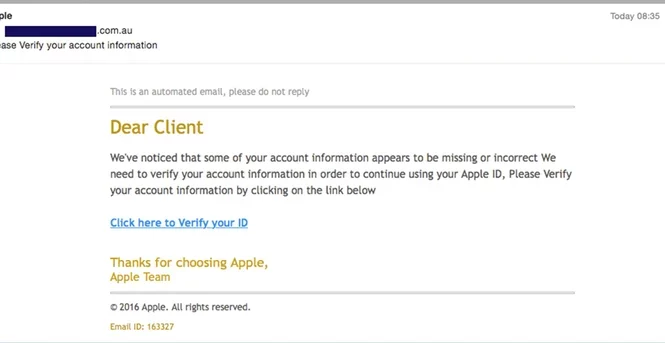
A digital scam I’ve personally encountered was a phishing email disguised as an Apple iCloud security notice. The subject of the email said: “Your Apple ID has been locked due to suspicious activity” and the message prompted me to click a “verify my account” link. It looked very convincing considering it had Apple’s logo, nice and clean organization, and even included a fake case number to make it appear official. The purpose of this scam was to steal my Apple ID login credentials and potentially my personal payment information. By redirecting me to a fake login page, the scammers hoped I would enter my username, password, as well as my credit card information. The scam relied on the fear the recipient felt when their important Apple ID information was under a threat. Most people do not want to lose access to their Apple information, so they click quickly without thinking thoroughly. Some ways to tell if it’s fake is a long or random email address that isn’t recognizable, hovering over the links to see if the address looks trustworthy, or logging into your Apple account on the real website and seeing if there is a real issue in your notifications. In addition, if the email claims there were charges to your account you can easily check your purchase history or your bank statement.
The main giveaway I find most of the times is the email address. I get emails constantly with email addresses where the company’s name is spelt wrong and the email is full of junk letters and numbers.

8 Responses
WOW, very informative
Thank you, I appreciate it!
This is very informative! Thank you for listing ways of recognizing whether it’s a scam, I’ll be sure to refer to those if I ever run into an email such as this. Great article!
Thank you! I’m glad you found this helpful.
Thank you so much for writing about this. Totally will now be on the look out for this.
Thanks, I’m glad to hear it!
Thank you for bringing attention to this! So informative and helpful.
Thanks for the feedback!